


PC上で Abra Magic のための互換性のあるAPKをダウンロードしてください
| ダウンロード | 開発者 | 評価 | スコア | 現在のバージョン | アダルトランキング |
|---|---|---|---|---|---|
| ↓ PC用のAPKをダウンロード | Paul Nettle | 0 | 0 | 1.0 | 4+ |
| SN. | アプリ | ダウンロード | 開発者 |
|---|---|---|---|
| 1. |
 QuizMagic
|
ダウンロード ↲ | Vidyatech Solutions Pvt. Ltd. |
| 2. |
ABC Word Magic
|
ダウンロード ↲ | Similesoft MP |
| 3. |
MindMagic
|
ダウンロード ↲ | Jeevan Samuel |
| 4. |
Love Magic
|
ダウンロード ↲ | iandreev |
| 5. |
The Magic Book
|
ダウンロード ↲ | Chekhov |
または、以下の PC (エミュレーター) 用の Abra Magic APK をダウンロードしてください。
3 つの簡単な手順で、コンピューターで Abra Magic.apk を使用する方法を説明します。
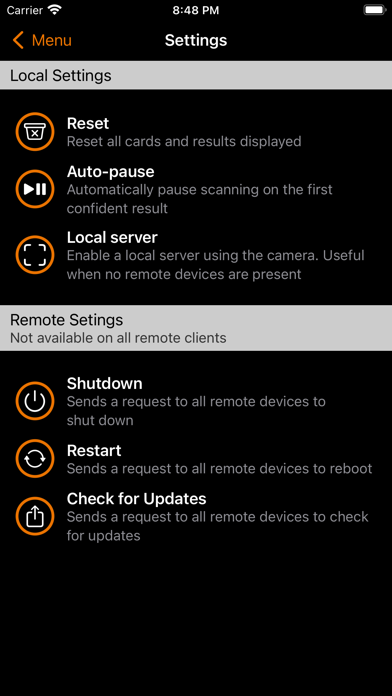
This app is part of the Nettle Magic Project (https://github.com/nettlep/magic). Take your card magic ot the next level. With Abra and a special deck of cards, you'll know the exact position of every card in the deck (or not in the deck, if cards are missing.) Abra can run in three different modes: 1. Stand-alone (Local server) - In this mode, Abra will scan the deck and show you the order of all cards in the deck. 2. Server (Advertised) - In this mode, Abra works similar to stand-alone with the addition of allowing other devices running Abra in Client mode on the same WiFi network to connect and view the scanning results of the server. Multiple clients can connect to the same server, providing unlimited of options for trick setup. 3. Client - In this mode, Abra will not scan the deck but will instead automatically detect and connect to a remote scanning server device on the same WiFi network. The Abra client will display the results of and configure that remote server. Features include: * Select from a number of supported code formats, including reversible and error-correctible codes. * Select from all available cameras on the device. * Long-tap on the deck to toggle display layouts. * Abra uses multiple scans from a continuous video feed to build a single confident scanning result. * Scanning confidence is reported to the user visually, with Red being low confidence and Green being high confidence. * Make sure your results aren't lost - automatically pause scanning as soon as a high-confident scan is capturd. * Automatically recognize decks in New Deck Order (NDO) for quick verification of tests. * Send an alert (vibration pulse) to all connected devices. * Use Abra to evaluate the quality of your marked deck by showing which cards scan well and which ones are difficult to scan. * Fully configure the server remotely, from scanning resolution to decoding options to scanning grid density. You're in complete control. IMPORTANT: To get real value from Abra, you will need access to an edge-marked deck of playing cards. As this is a hobbyist project, this probably means making one yourself. Documentation for applying edge-marks to a standard deck of playing cards can be found here: https://nettlep.github.io/magic/#marking.





