PC上で Interval Climb のための互換性のあるAPKをダウンロードしてください
| ダウンロード | 開発者 | 評価 | スコア | 現在のバージョン | アダルトランキング |
|---|---|---|---|---|---|
| ↓ PC用のAPKをダウンロード | Laura Gabrielson | 0 | 0 | 2.5 | 4+ |
3 つの簡単な手順で、コンピューターで Interval Climb.apk を使用する方法を説明します。
Interval Climb iTunes上で
| ダウンロード | 開発者 | 評価 | スコア | 現在のバージョン | アダルトランキング |
|---|---|---|---|---|---|
| ¥300 iTunes上で | Laura Gabrielson | 0 | 0 | 2.5 | 4+ |
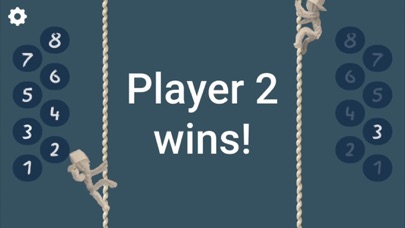
This 2-player game is a fun alternative to flashcards for learning interval degrees on the musical staff. Grab a friend and race to see whose character climbs to the top of the rope faster. Each interval you get correct moves you up the rope, while wrong answers make you slide down. Customize the settings to focus on the interval degrees and type you are interested in: - Play with your choice of intervals, unison through octave. Select only the intervals you want to play with. - Choose if you want to play with only harmonic, only melodic, or both harmonic and melodic intervals. - Option to include/exclude ledger lines - Select English or Italian ordinal number abbreviations. Two ways to play! Select the bottom-left button to switch between grand staff and single staff games. For the grand staff, each player has his/her own staff - see who can identify the most intervals on their staff the fastest. For the single staff, players race to be the first to select the correct degree for each interval shown. The single staff game also includes audio, so you can hear the intervals. Between games, select an interval degree to see the interval on the staff. Tap the clef mark to switch between treble and bass clefs. Tap the eye to show/hide the clef marks. Change the theme to see the characters throw different objects. New seasonal themes become available every 3-5 weeks, in addition to ongoing themes of sports, music and chess. What teachers are saying: "Healthy competition is a stimulus for concentration... I let [a student] start alone and then begin the frantic chase. I like that this application makes it possible to identify the interval using a number. A child must first be able to differentiate a third from a fourth or an octave and only then whether it is perfect, major, minor... It is also interesting that the interface of this application is minimalist, eliminating unnecessary distractions." - Ricardo M.