
PC上で Midori(和英・英和辞典) のための互換性のあるAPKをダウンロードしてください
| ダウンロード | 開発者 | 評価 | スコア | 現在のバージョン | アダルトランキング |
|---|---|---|---|---|---|
| ↓ PC用のAPKをダウンロード | Sukolsak Sakshuwong | 73 | 4.61644 | 1.9.15 | 4+ |
| SN. | アプリ | ダウンロード | 開発者 |
|---|---|---|---|
| 1. |
 Super Japanese Dictionary
|
ダウンロード ↲ | Penzo |
| 2. |
Thai Japanese dictionary
|
ダウンロード ↲ | Dict.land |
| 3. |
Japanese<>English Dictionary |
ダウンロード ↲ | CODORE OOD |
| 4. |
Korean Japanese dictionary |
ダウンロード ↲ | Dict.land |
| 5. |
Japanese Mongolian dictionary |
ダウンロード ↲ | Dict.land |
または、以下の PC (エミュレーター) 用の Midori(和英・英和辞典) APK をダウンロードしてください。
3 つの簡単な手順で、コンピューターで Midori(和英・英和辞典).apk を使用する方法を説明します。
Midori(和英・英和辞典) iTunes上で
| ダウンロード | 開発者 | 評価 | スコア | 現在のバージョン | アダルトランキング |
|---|---|---|---|---|---|
| 無料 iTunes上で | Sukolsak Sakshuwong | 73 | 4.61644 | 1.9.15 | 4+ |
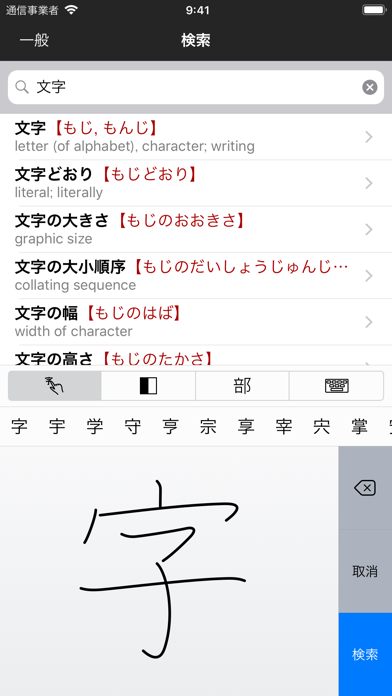
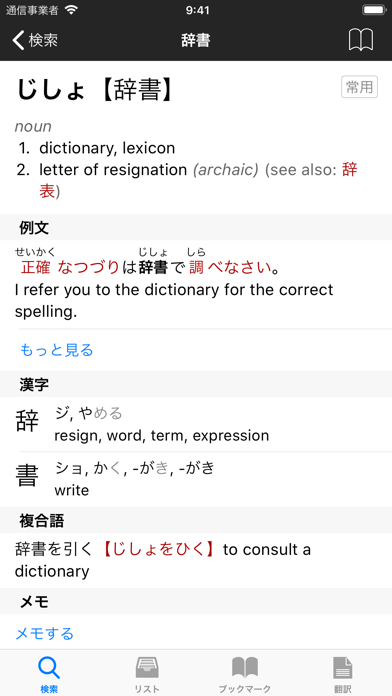
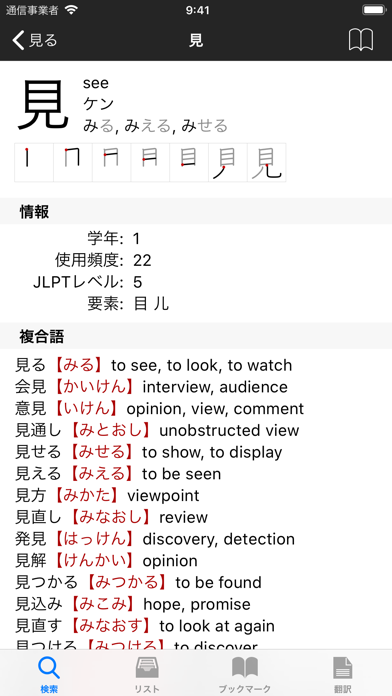
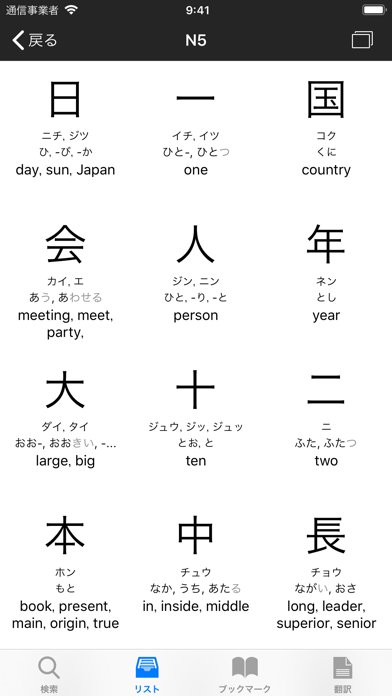
(English description is available below.) Midoriは和英/英和の辞書アプリです。英語を学んでいる日本人や日本語を学んでいる英語圏の方、漢字の読み方を調べたい人にぴったりの総合的な辞書機能を搭載し、180,000以上の語彙を収録。150,000もの例文と730,000にもおよぶ名称、そして多くの便利な機能があなたの「学び」をしっかりサポートします。 辞書に収録されている内容 • 180,000語以上の語彙を収録。各語彙では、読み方、意味および漢字個別の意味(英和モード)を表示します。ほとんどのエントリーにはふりがなと共に例文も収録しています。 • 例文内の単語にもリンクが定義されて次々と意味を調べられます。 • 12,000もの漢字を収録。各漢字には読み方と意味、組み合わせ例が表示されます。 • 漢字6,000語の書き順を、図とアニメーションで説明します。 • 730,000にもおよぶ固有名詞、地名、人姓、人名、会社名、製品名を収録しています。 検索 & 翻訳 • 「あき」「aki」「aき」のようなかな、ローマ字および両方の組み合わせによって検索できます。 • 手書き文字入力機能を搭載。日本語を手書き文字から認識し、変換して検索できます。 • 漢字の部首毎の入力による検索できます。例: 禾 + 火 -> 秋。 • 入力した単語の意味を含む語彙を表示できます。例: 走った -> 走る。 • インクリメンタルサーチより、入力のたびに単語候補を表示します。 • 日本語テキストをタップするだけで自分だけの単語帳を作成できます。 リストとブックマーク • 日本の小学校1年から6年生までで習う漢字リスト • 日本語の新聞でよく使われる漢字リスト • 日本語能力試験(JLPT)レベルの漢字と単語リスト • フォルダ管理をサポートしたブックマーク。書出し、読込み、共有ができます。 その他の機能 • ブックマークした単語や漢字から単語帳の作成が可能 • iPadでは、漢字の書き練習のためのメモ用紙機能を搭載 • インターネット接続がなくてもオフラインで使用可能 • ユニバーサルアプリなので、一度購入すればお持ちのiPhone、iPad、iPod touchすべてに対応できます。 ホームページ(midoriapp.com (英語))では、アプリの詳しい情報や多数のスクリーンショットを掲載しています。もし、アプリについてご意見・ご要望がございましたらぜひお知らせください。今後のアップデートに役立てます。 Midori is a Japanese-English, English-Japanese dictionary app. It's a comprehensive dictionary with 170,000 entries, 150,000 example sentences, 720,000 names, and many advanced features, including handwriting recognition, example sentences with furigana, flashcards with spaced repetition system, and many more. For more details in English, visit www.MidoriApp.com. ACKNOWLEDGEMENT This application has included material from the JMdict (EDICT, etc.) dictionary files in accordance with the licence provisions of the Electronic Dictionaries Research Group. See http://www.csse.monash.edu.au/~jwb/edict.html
problem since last iOS update
Been using this app for ages, and I love it. But since the latest iOS update (15.4.1), in "translate" mode, the right column does not jump to the word selected in the text. Extremely useful feature when it worked, now it's very annoying to keep up between reading the text and finding the corresponding words in the right column. Thank you for fixing this as soon as you can.
Worth every penny!
The app contains so many vocabularies, especially of speaking language. I love that I can easily search for people name. Bookmarks and offline dictionary are also very helpful
Amazing app for Japanese Study
I highly recommend this app! I've been using it for more than two years and it has been a game changers. It's designed well and has a lot of great features! I especially love the ability to save and organize vocabulary/example sentences into lists that I can go back review at anytime.
1.8.6 Version - Ugh!!!
Is there a way to remove the SKIP function on the 1.8.6 release? I had the book years ago. Except for the vertical radial lookups, the horizontal and box lookups were/are confusing and absolutely un-useful. Having the extra function box on the top of Midori gets in the way of the stroke function which I use extensively. If you don't want to remove it, on the next release, can you move it to the far left so that I don't have to reach over it? Sorry, Mr. Halpern, otsukaresame, but your system isn't isn't useful (except for the vertical lookups). From a two-year user, I have rated Midori a five-star. Would revert if the SKIP function is removed.
Fentastic app
App not displaying words correctly after iOS 11 upgrade. Please check and make changes. Issue happening only when the word has characters less than 4. There is no issue with long words.