
認証アプリ 7

認証アプリ 7 - パソコン用

  • カテゴリ: Utilities
  • 最終更新日: 2025-12-16
  • 現在のバージョン: 1.7.31
  • ファイルサイズ: 37.12 MB
  • 開発者: SMM service, s.r.o.
  • 互換性: Windows 11, Windows 10, 8, 7 + MAC
累積的なユーザー評価:

4/5

4
571 レビュー

プレビュー


PC上で 認証アプリ 7 のための互換性のあるAPKをダウンロードしてください


ダウンロード 開発者 評価 スコア 現在のバージョン アダルトランキング
↓ PC用のAPKをダウンロード SMM service, s.r.o. 571 4.39229 1.7.31 17+

ダウンロードとインストール あなたのWindows PCで

💻 Windows ストアを確認したところ、次の 認証アプリ 7 アプリが見つかりました (直接ダウンロード可能):


SN. アプリ ダウンロード 開発者
1.   SAP Authenticator    ダウンロード ↲ SAP SE
2.   2FA Authenticator ダウンロード ↲ B4C Studio
3.   Yubico Authenticator ダウンロード ↲ Yubico AB
4.   Authenticator for Windows
2018
ダウンロード ↲ Uhlik
5.   SecurID Authenticator ダウンロード ↲ RSA Security LLC

または、以下の PC (エミュレーター) 用の 認証アプリ 7 APK をダウンロードしてください。


3 つの簡単な手順で、コンピューターで 認証アプリ 7.apk を使用する方法を説明します。


  1. Androidアプリエミュレーターをダウンロードする.
    エミュレーターは、コンピュータ上でAndroidデバイスを模倣/エミュレートし、PCの快適さからAndroidアプリを簡単にインストールして実行できるようにします。以下に最高のものをリストアップしました。
    1. Nox »
    2. Bluestacks »

  2. Windows PCにBluestacks.exeまたはNox.exeソフトウェアエミュレーターをインストールしてください。

  3. PCで認証アプリ 7を実行する:
    1. インストールが完了したら、エミュレーターアプリを開き、検索バーに 認証アプリ 7 と入力して検索します。
    2. すぐに 認証アプリ 7 が表示されます。それを開いてインストールをクリックしてください。アプリのインストールが始まります。
    3. PCで 認証アプリ 7 アプリを実行するには、エミュレーターを開いて「すべてのアプリ」→ 認証アプリ 7 を選択します。

認証アプリ 7 iTunes上で


ダウンロード 開発者 評価 スコア 現在のバージョン アダルトランキング
無料 iTunes上で SMM service, s.r.o. 571 4.39229 1.7.31 17+

約 認証アプリ 7

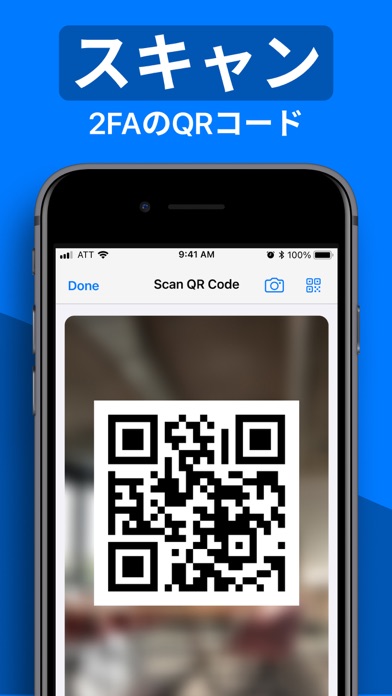
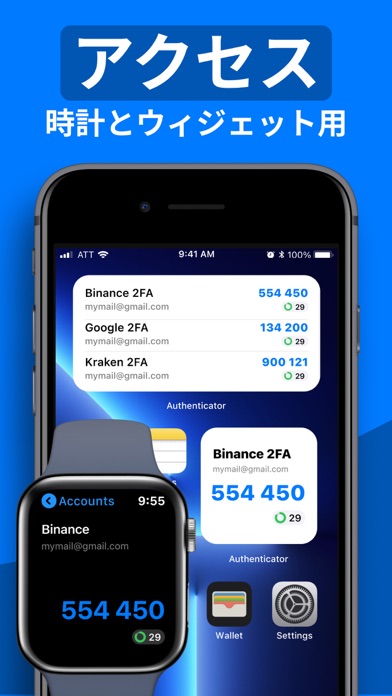
Authenticator 7 - Store and generate secure 2FA (two-factor authentication) tokens for your online accounts on your device. The Authenticator 7 helps you protect your account from hackers by adding an additional layer of security. Secure & Private: All data stored in Authenticator is always encrypted, even when it's stored in iCloud, to ensure that you are the only one who can access your data. 2FA Secured Backup: Safe and secure encrypted iCloud backups for all your 2FA codes, passwords, and secret keys. You can easily restore access to your keys on a new device or use our app on multiple devices with automatic cross-device synchronization. Synchronization Across all Devices: With Authenticator, all your tokens will automatically synchronize across all Apple devices. Once configured with an online account, the application works efficiently on various mobile devices and allows you to log in from several devices at once. Import from other apps: You can export all your 2FA keys from any other external app and import them into our app in one tap. Just scan the QR code from the other 2FA app with our app or use CSV file import to import an unlimited amount of 2FA codes to our app. Export from our app: You can easily export all 2FA codes from our app in just a single tap. Export them as a CSV file or QR code. Watch Faces App: Get access to all your 2FA codes from your Apple Watch. Folders: Create multiple folders for your 2FA codes to categorize them in a convenient way. You can move codes with the drag-and-drop feature. Custom Icons: Add custom or system icons to any of your 2FA codes to better recognize them on the list with many codes. The application automatically recognizes the service icon (favicon). Password Manager: Store all your passwords in one secure storage. Get automatic password leaks protection and security reports for leaked passwords. Get a push if your password is leaked in some data leak. Password generator: Generate a strong password with multiple security settings and smart password creation tips. Set up the password length and use unique symbols and numbers. App PIN lock: Set up a 4-digit PIN to protect your app from other people and set up an auto-lock feature for the app to automatically lock the app with a PIN after exiting the app. Authorize with Face/Touch ID: Confirm your identity with the application using Face/Touch ID and generate one-time tokens required to log in to your online accounts. All Popular Services: Manually tested on 10,000+ most popular services. We support the most popular services including Google, Facebook, Twitter, Instagram, LinkedIn, Amazon, Microsoft, Dropbox, PayPal, eBay, Snapchat, Pinterest, Reddit, Yahoo, Shopify, Slack, Zoom, Airbnb, Uber and much more! Private browser: Fast and secure browser with no history, logs or cookies, allowing you to browse the web without leaving any traces. It also includes bookmarking and tabbed browsing for a convenient and personalized browsing experience. VPN: Secure and private internet connection by encrypting your online traffic and masking your IP address. With servers located in various countries, you can browse the internet anonymously and access restricted content from anywhere. Our VPN also blocks unwanted ads and malicious websites to protect you from cyber threats. Plus, our no-logs policy ensures that your online activity stays private. The VPN module is easy to use, with a simple one-tap connection and automatic server selection. Whether you're on public Wi-Fi or just want to keep your online activity private, our VPN module has got you covered. Privacy Policy: https://www.team2swift.com/privacy-authenticator/ Terms of Use: https://www.team2swift.com/terms-authenticator/ For any questions or requests, please use our customer support form at: https://www.team2swift.com/support/


アプリ レビュー


  • バイ 如月 螢♪
    1

    良くわからない

    日本語じゃないし、有料みたいなので使えない


keyboard_arrow_up